Install the Vine-Reviewer extension
One click from the Chrome Web Store. Auto-updates in the background. Works on Amazon Vine pages out of the box.
Free to install. Sign in with your existing vine-reviewer.com account.
Install in three clicks
Under 60 seconds, start to finish.
Open the Chrome Web Store listing
Click the button. The Vine-Reviewer page opens in a new tab on the Chrome Web Store.
Add to Chrome
Click the “Add to Chrome” button on the store listing. Your browser shows a permissions popup — review it, then confirm. The extension installs in seconds.
What you're approving:
- Access to Amazon Vine pages (so the extension can read product info and inject the Generate widget)
- Access to vine-reviewer.com (so it can call the AI review API with your existing session)
- Local storage (to cache product data and submission markers between pages)
Sign in and start reviewing
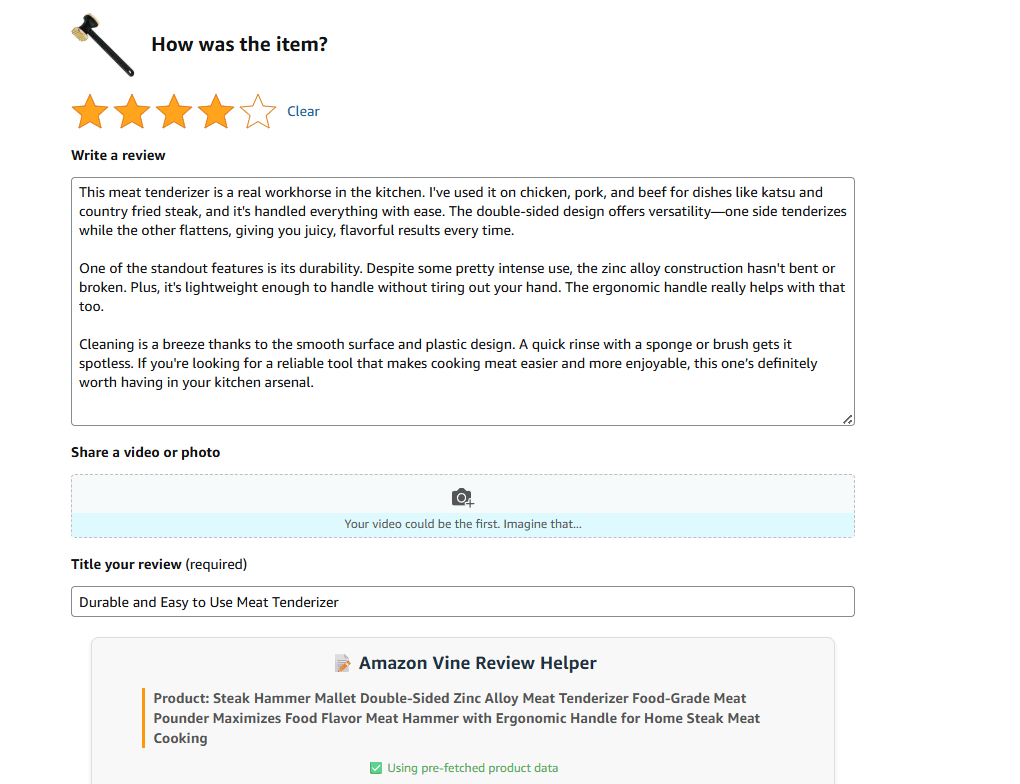
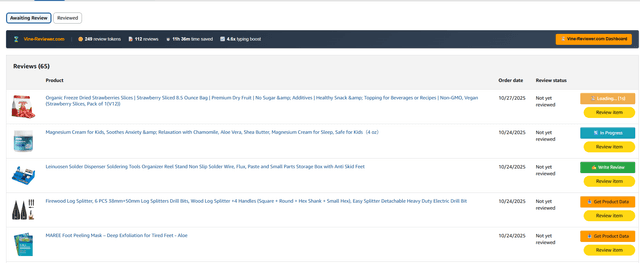
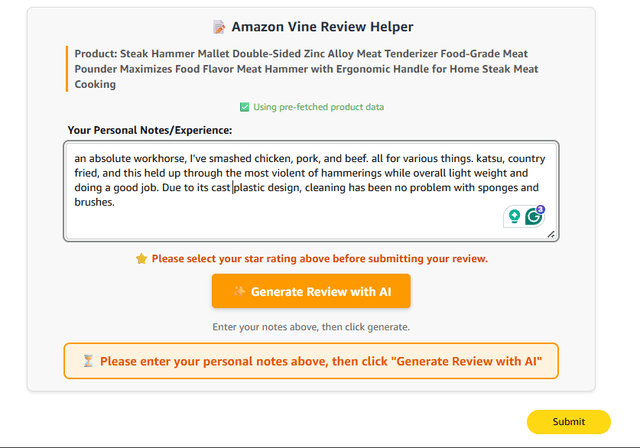
Make sure you're signed in to vine-reviewer.com — the extension reuses your existing session, so no new login. Then open the Reviews tab in Amazon Vine. Next to any item, click Write Review, type what you thought, and click Draft my review.
On Firefox?
Same extension, same account, same 10 free reviews. Firefox installs it from Mozilla's add-on store instead of Google's.
Get it on Firefox Add-onsOn an iPad or iPhone?
Chrome on iOS can't run extensions — that's an Apple restriction, not ours. But you can still use Vine-Reviewer on an iPad or iPhone with the free Orion browser, which supports Chrome extensions.
- 1
Install Orion from the App Store (it's free).
- 2
In Orion, open Settings → Advanced and turn on Chrome Extensions.
- 3
Open this page (vine-reviewer.com/download) in Orion and add Vine-Reviewer from the Chrome Web Store — tap Extensions → + → Install Chrome Extension and search for it.
- 4
Sign in at vine-reviewer.com as usual. If the extension says it can't connect, copy your connect code from your dashboard and paste it into the extension's “Trouble connecting?” box.
Always up to date
Vine-Reviewer auto-updates through the Chrome Web Store. New features and bug fixes roll out automatically in the background — usually within 24 hours of release.
No version tracking, no broken installs, no extra dashboards to check. Open Chrome and you've got the latest build.
Want to see the current version? Click the extension icon in your toolbar, or visit chrome://extensions.
- ✓ Auto-updates
- ✓ No restarts
- ✓ No manual installs
- ✓ Reviewed by Google
Frequently Asked Questions
How does Vine-Reviewer.com work?
Vine-Reviewer.com uses AI to generate high-quality, honest reviews based on your notes about the product. The extension adds a small widget on Amazon's Vine pages so you can generate and submit reviews without leaving the page.
How do updates work?
Updates happen automatically through the Chrome Web Store. New features and bug fixes roll out in the background — typically within 24 hours of release. You don't need to do anything.
Can I use it on an iPad or iPhone?
Yes — with one extra step. Chrome on iOS can't run extensions (an Apple restriction), so use the free Orion browser instead. Install Orion from the App Store, enable Chrome Extensions in its settings, then add Vine-Reviewer from the Chrome Web Store inside Orion. See the “On an iPad or iPhone?” steps above for the full walkthrough.
Is my data secure?
Yes. The extension only sends your product notes to our secure API. We never store your Amazon credentials or access your Amazon account directly. All communication is encrypted.
How many tokens do I need?
Each review costs 1 token. You can purchase tokens in packages (Small: 10 tokens, Medium: 25 tokens, Large: 50 tokens) or subscribe to a plan for unlimited reviews.
Can I edit the generated reviews?
Yes. The extension fills in the review fields on Amazon, but you can edit them before submitting. Every review should reflect your real experience with the product.
